Featured image of post Read Code of CLIP

Read Code of CLIP

Gaining New Inspiration from CLIP Code

语速

Contrastive Language-Image Pre-Training (CLIP) is one of the classic works from OpenAI, originating from the paper .

To implement my new idea based on CLIP, I attempted to read openai/clip to understand the fundamental working principles of CLIP in classification.

Here is the Python sample code provided by openai/clip:

 1
 2
 3
 4
 5
 6
 7
 8
 9
10
11
12
13
14
15
16
17
18
import torch
import clip
from PIL import Image

device = "cuda" if torch.cuda.is_available() else "cpu"
model, preprocess = clip.load("ViT-B/32", device=device)

image = preprocess(Image.open("CLIP.png")).unsqueeze(0).to(device)
text = clip.tokenize(["a diagram", "a dog", "a cat"]).to(device)

with torch.no_grad():
    image_features = model.encode_image(image)
    text_features = model.encode_text(text)

    logits_per_image, logits_per_text = model(image, text)
    probs = logits_per_image.softmax(dim=-1).cpu().numpy()

print("Label probs:", probs)  # prints: [[0.9927937  0.00421068 0.00299572]]

The load function is used to load a specific OpenAI model. This is based on ViT-B/32, a Vision Transformer 32B.

It can be seen that the vision encoders supported by OpenAI roughly include the following types:

 1
 2
 3
 4
 5
 6
 7
 8
 9
10
11
_MODELS = {
    "RN50": "https://openaipublic.azureedge.net/clip/models/afeb0e10f9e5a86da6080e35cf09123aca3b358a0c3e3b6c78a7b63bc04b6762/RN50.pt",
    "RN101": "https://openaipublic.azureedge.net/clip/models/8fa8567bab74a42d41c5915025a8e4538c3bdbe8804a470a72f30b0d94fab599/RN101.pt",
    "RN50x4": "https://openaipublic.azureedge.net/clip/models/7e526bd135e493cef0776de27d5f42653e6b4c8bf9e0f653bb11773263205fdd/RN50x4.pt",
    "RN50x16": "https://openaipublic.azureedge.net/clip/models/52378b407f34354e150460fe41077663dd5b39c54cd0bfd2b27167a4a06ec9aa/RN50x16.pt",
    "RN50x64": "https://openaipublic.azureedge.net/clip/models/be1cfb55d75a9666199fb2206c106743da0f6468c9d327f3e0d0a543a9919d9c/RN50x64.pt",
    "ViT-B/32": "https://openaipublic.azureedge.net/clip/models/40d365715913c9da98579312b702a82c18be219cc2a73407c4526f58eba950af/ViT-B-32.pt",
    "ViT-B/16": "https://openaipublic.azureedge.net/clip/models/5806e77cd80f8b59890b7e101eabd078d9fb84e6937f9e85e4ecb61988df416f/ViT-B-16.pt",
    "ViT-L/14": "https://openaipublic.azureedge.net/clip/models/b8cca3fd41ae0c99ba7e8951adf17d267cdb84cd88be6f7c2e0eca1737a03836/ViT-L-14.pt",
    "ViT-L/14@336px": "https://openaipublic.azureedge.net/clip/models/3035c92b350959924f9f00213499208652fc7ea050643e8b385c2dac08641f02/ViT-L-14-336px.pt",
}

Assuming the model has already been downloaded, let’s examine how the _transform preprocessing works:

1
2
3
4
5
6
7
8
def _transform(n_px):
    return Compose([
        Resize(n_px, interpolation=BICUBIC),
        CenterCrop(n_px),
        _convert_image_to_rgb,
        ToTensor(),
        Normalize((0.48145466, 0.4578275, 0.40821073), (0.26862954, 0.26130258, 0.27577711)),
    ])

It’s not overly complex, though the preprocessing Normalize parameters are not entirely clear. It seems to use the same preprocessing parameters as ViT.

Then, moving into the model loading phase, we can see that if it’s not jit loading, the model will opt for the state_dict mode.
Through the process of loading the state_dict, we can observe that the build_model function is used to load the weights and assign them to the existing model structure.

The file for this model structure is model.py.
Therefore, the main code for CLIP is located at model.py#L243.

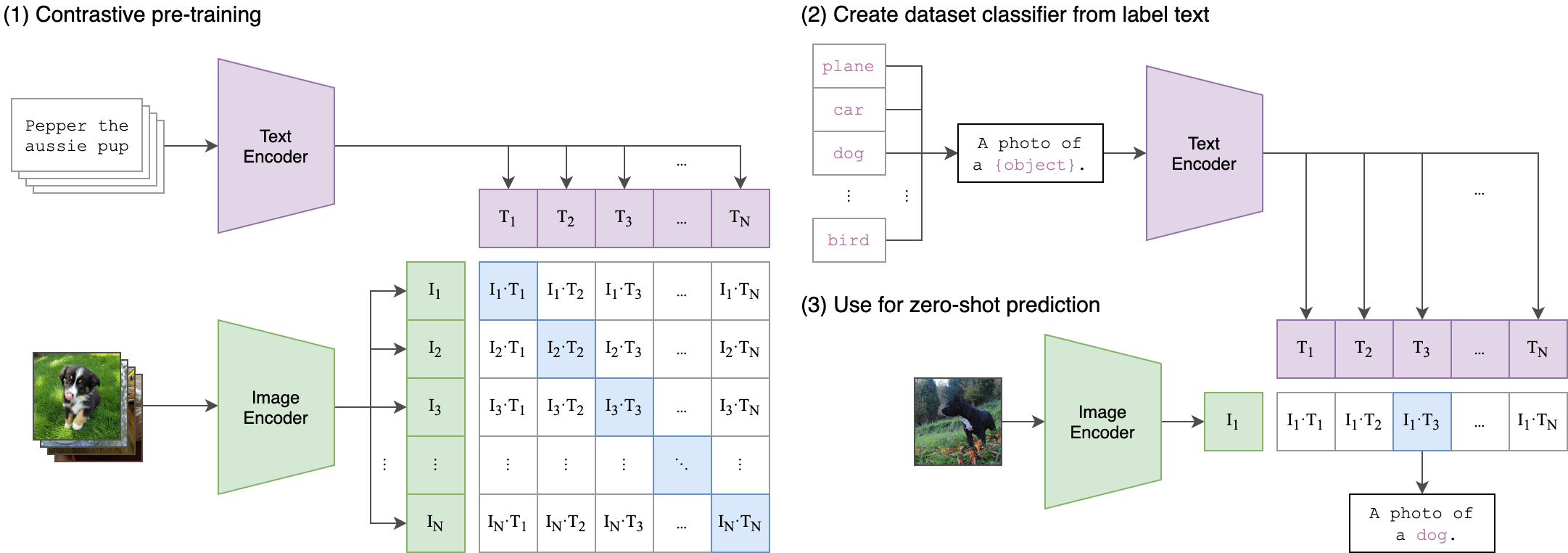
The outputs of the image_encoder and text_encoder are two distinct feature tensors.

Performing a matrix multiplication on these two tensors yields a similarity matrix. The size of this similarity matrix is (batch_size, batch_size).

TIPS: If the batch size is too small, such as 1, the performance of contrastive learning may be significantly diminished.

These two tensors are computed using symmetric cross-entropy loss to update the network weights.

Specifically focused on improving intelligence metrics, without much concern for computational cost. Not pursuing the latest or highest intelligence metrics, but more focused on the computational efficiency of the model.

Trick: Adding a log to the parameters to make weight updates less drastic and reduce computational intensity.

The CLIP code does not provide directly trainable code. In the next article, we’ll attempt to read openclip.